
Download Fotol AI Image Generator – AI‑Powered Text‑to‑Image Tool for Creative Professionals
Overview
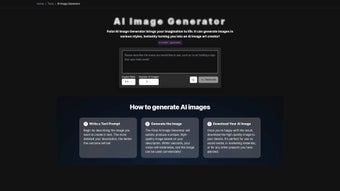
Fotol AI Image Generator is a cutting‑edge, web‑based platform that transforms ordinary text prompts into high‑resolution images in a matter of seconds. Powered by the state‑of‑the‑art Flux model, the service produces ultra‑sharp visuals that span realistic photography, stylized cartoons, anime‑inspired artwork, and futuristic cyberpunk scenes. The interface is intentionally minimalist: users type a description, select a preferred artistic style, and press “Generate.” Within ten seconds the AI returns a set of variations that can be downloaded instantly. This simplicity eliminates the steep learning curves associated with traditional graphic‑design software, making the tool accessible to designers, marketers, content creators, and hobbyists alike.
What truly differentiates Fotol AI from other text‑to‑image generators is its commercial‑ready licensing model. Every image created is royalty‑free, allowing unrestricted use in advertising campaigns, product mockups, blog posts, or even for sale as part of a design package. Because the platform runs entirely in the browser, there is no need for local installation, and all processing occurs on secure remote servers. This architecture guarantees that user data remains private, prompts are transmitted over encrypted HTTPS connections, and no personal information is stored beyond what is necessary for account management.
Regular updates keep the underlying AI model fresh, adding new artistic styles, improving language‑image mapping, and expanding resolution options. Whether you need a single hero image for a landing page or a series of illustrations for an e‑book, Fotol AI delivers consistent quality and speed. Its blend of sophisticated AI, user‑friendly design, and commercial‑grade output makes it an indispensable addition to any creative workflow that values efficiency, affordability, and legal clarity.
Key Features
- Instant Text‑to‑Image Conversion: Generate high‑quality visuals in under 10 seconds from plain English prompts.
- Multiple Artistic Styles: Choose from realism, cartoon, anime, cyberpunk, and new styles added regularly.
- Flux Model Backbone: Leverages the latest Flux AI architecture for ultra‑sharp, detailed outputs.
- Commercial‑Ready Licensing: All images are royalty‑free, allowing unlimited commercial use.
- Browser‑Based Platform: No download or installation required; works on any modern web browser.
- Secure Data Handling: Prompts are processed over encrypted connections; no personal data is retained.
- Batch Generation: Create up to five variations per prompt to explore creative alternatives.
- Resolution Options: Export at 512×512, 1024×1024, or 2048×2048 pixels depending on project needs.
- One‑Click Download & Sharing: Save images as PNG or JPEG and share directly to social media.
- Continuous Model Updates: Ongoing improvements to language comprehension and style fidelity.
The feature set is deliberately crafted for both novices and seasoned creators. Beginners appreciate the straightforward prompt system and preset styles, while power users can fine‑tune outputs using advanced sliders for “Creativity,” “Detail,” and “Color Saturation.” Because Fotol AI is cloud‑hosted, you always access the most recent version of the Flux model without manual updates, ensuring your workflow remains future‑proof.
Scalability is another hallmark of the platform. Whether you require a single illustration for a blog post or a batch of assets for a full marketing campaign, Fotol AI dynamically balances server load to maintain fast response times even during peak usage. This reliability translates into predictable turnaround times, a critical factor for agencies and enterprises that depend on tight deadlines.
Installation & Usage Guide
Fotol AI Image Generator is a web‑based service, so there is no traditional software installation. Follow these steps to start creating images instantly:
- Open the Platform: Launch any modern browser (Chrome, Edge, Firefox, Safari) and go to https://fotol.ai. The landing page presents a clean dashboard with a text input, style selector, and a “Generate” button.
- Create an Account (Optional): While anonymous generation is possible, registering unlocks higher‑resolution exports, batch generation, and a personal gallery for saving favorite creations.
- Enter Your Prompt: Write a clear, descriptive sentence. For example: “A neon‑lit cyberpunk marketplace at night, with holographic signs and bustling crowds.”
- Select a Style: Choose from the dropdown menu—Realism, Cartoon, Anime, Cyberpunk, etc. The selected style influences color palette, line work, and overall mood.
- Adjust Advanced Settings (Optional): Use sliders for “Creativity,” “Detail,” and “Color Saturation” to guide the AI toward a specific aesthetic. These controls are optional but helpful for fine‑tuning.
- Generate the Image: Click “Generate.” Within seconds the AI produces 1‑5 variations, displayed as thumbnails. Hover to view a larger preview.
- Download or Share: Click the download icon to save the image as PNG or JPEG. Use the share button to copy a direct link or post straight to Facebook, Twitter, or Instagram.
- Save Prompts (Optional): Logged‑in users can store prompts in a “Prompt Library” for quick reuse or modification later.
For teams, Fotol AI offers a collaborative workspace where members can comment on generated images, suggest revisions, and vote on the best version. This feature streamlines feedback loops and ensures the final visual aligns with project objectives without leaving the browser.
If you encounter issues such as slow loading or unexpected errors, consult the “Help Center” linked in the footer. The knowledge base provides troubleshooting steps, browser compatibility notes, and a contact form for direct support. Because the service runs entirely in the cloud, most problems are resolved quickly without the need for local re‑installation or updates.
Compatibility, Pros & Cons, FAQ & Conclusion
Fotol AI Image Generator works on any device that runs a modern web browser, including Windows 10/11, macOS Monterey and later, Linux distributions, Android 8.0+, and iOS 13+. No specific hardware acceleration is required, making it accessible on low‑end laptops, tablets, and smartphones alike. The only prerequisite is a stable internet connection, as all processing occurs on remote servers.
Pros
- Instant, high‑quality image generation without any software download.
- Wide array of artistic styles suitable for diverse creative projects.
- Royalty‑free licensing enables unrestricted commercial use.
- Secure, encrypted connections ensure user privacy.
- Scalable performance for both single images and batch workloads.
- User‑friendly interface that welcomes beginners.
- Continuous AI model updates keep the output fresh and relevant.
Cons
- Requires an active internet connection; offline usage is not possible.
- Free tier limits resolution and batch size, prompting many users to upgrade.
- Complex or highly abstract prompts may need multiple iterations to achieve the desired result.
- Output variability can be higher for very niche artistic concepts.
Frequently Asked Questions
Is Fotol AI Image Generator free to use?
Fotol AI offers a free tier that lets you generate low‑resolution images and up to three variations per prompt. Higher resolutions, larger batch sizes, and unlimited commercial usage require a paid subscription.
Can I use the generated images for commercial projects?
Yes. All images created with Fotol AI are royalty‑free and can be incorporated into marketing, advertising, product packaging, or any commercial context without additional licensing fees.
What file formats are available for download?
You can download images as PNG (lossless) or JPEG (compressed) files. The format selection appears after the image generation is complete.
How does Fotol AI handle user privacy?
All prompts are transmitted over HTTPS and are not stored permanently on the server. If you create an account, only minimal personal data (email and password hash) is retained, complying with GDPR and CCPA standards.
Can I integrate Fotol AI into my existing workflow?
Yes. Premium users gain access to an API that allows programmatic image generation from within design tools, content management systems, or custom scripts.
Conclusion
Fotol AI Image Generator stands out as a powerful, secure, and user‑friendly solution for anyone who needs high‑quality visuals at speed. By marrying the sophisticated Flux model with an intuitive web interface, it removes traditional bottlenecks such as expensive software licenses, steep learning curves, and licensing uncertainty. Whether you are a marketer hunting for eye‑catching ad graphics, a writer needing story illustrations, or a developer building assets for an app, Fotol AI delivers reliable, commercial‑ready images in seconds.
Ready to turn your ideas into stunning visuals? Download Fotol AI Image Generator now and start creating for free. Upgrade to a premium plan for unlimited resolutions, batch processing, and API access, and watch your creative workflow accelerate like never before.
Review Summary
Pros: Instant generation, diverse styles, commercial‑ready licensing, secure cloud processing.
Cons: Requires internet, advanced features behind a paywall.



.png)



